在Ubuntu 10.10 要掛載網路磁碟機並且可以讀寫權限
1. 建立目錄(Create folder)
cd /media
sudo mkdir temp
2.掛載網路磁碟機 (Mount samba share folder)
sudo smbmount //ip_address/foldername /media/temp -o user=username,pass=password,iocharset=utf8,dir_mode=0777,file_mode=0777,uid=current login user name

Monday, March 18, 2013

Tuesday, January 15, 2013
[ffmpeg]剪輯影片- Cutting video
<code>ffmpeg -i in.mp4 -ss [start] -t [duration] -c:v copy -c:a copy out.mp4

time format
start: 00:00:00.000
duration: 00:00:00.000

reference:http://superuser.com/questions/377343/cut-part-from-video-file-from-start-position-to-end-position-with-ffmpeg
</code>

Wednesday, September 26, 2012
[Ubuntu]好用的螢幕截圖並可以編輯的軟體Shutter
Ubuntu 12.04
軟體中心->shutter 安裝即可
Ubuntu 10.04
Synaptic->shutter 安裝
要另外多安裝下列套件,才可有截圖後編輯的功能
Synaptic->libgoo-canvas-perl
Monday, September 17, 2012
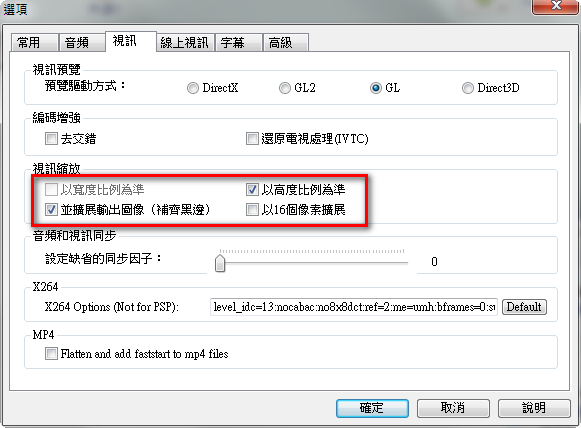
[影片]將手機拍攝的直立影片加上黑框變成橫向影片
使用手機拍攝影片時,常會以直立方式進行拍攝,但在上傳至facebook或其他影音網站時,可能會遇到問題,因此如果能以加上黑邊方式,將影片轉換為橫向影片,就可以解決。
1.下載免費工具Any Video Converter
2.設定選項

1.下載免費工具Any Video Converter
2.設定選項
Sunday, August 5, 2012
[Ubuntu] User is not in the sudoers file
1. Reboot the system
2. Boot into "Recovery" mode
3. Select "Root Session"
4. Execute command as following to remount root filesystem
mount -o remount,rw /
5. Edit /etc/sudoers to add username to sudo user
# User privilege specification
username ALL=(ALL:ALL) ALL
6. Reboot
Error: "usermod: cannot lock /etc/passwd; try again later"
Reference:http://askubuntu.com/questions/79933/deleted-myself-from-admin-group-now-getting-error-usermod-cannot-lock-etc-pa
2. Boot into "Recovery" mode
3. Select "Root Session"
4. Execute command as following to remount root filesystem
mount -o remount,rw /
5. Edit /etc/sudoers to add username to sudo user
# User privilege specification
username ALL=(ALL:ALL) ALL
6. Reboot
Error: "usermod: cannot lock /etc/passwd; try again later"
Reference:http://askubuntu.com/questions/79933/deleted-myself-from-admin-group-now-getting-error-usermod-cannot-lock-etc-pa
Wednesday, June 13, 2012
[CentOS5] SVN Commit後透過Gmail發送email通知(SVN Post-Commit to send email notify via Gmail)
在CentOS 5中,使用SVN Commit Code後要自動發送通知,進行下列2個步驟即可,如果不是使用Gmail的smtp,則跳過第1步驟
在我使用時要修改一下才可正常發送
svn_email_commit.sh中
38 | # Send email |
39 | cat $TMPFILE | mail -a "From: $SENDFROM" -s "$SUBJECT" "$SENDTO" |
在我使用時要修改一下才可正常發送
38 | # Send email |
39 | cat $TMPFILE | mail -s "$SUBJECT" "$SENDTO" |
Tuesday, May 22, 2012
[Ubuntu]10.04 Parital Upgrade Error
Error Message:subprocess installed pre-removal script returned error exit status 2
Package : adobe-flashplugin
Removing adobe-flashplugin ...
update-alternatives: error: no alternatives for iceape-flashplugin.
update-alternatives: error: no alternatives for iceape-flashplugin.
dpkg: error processing adobe-flashplugin (--remove):
subprocess installed pre-removal script returned error exit status 2
postinst called with argument `abort-remove'
dpkg: error while cleaning up:
subprocess installed post-installation script returned error exit status 1
Errors were encountered while processing:
adobe-flashplugin
E: Sub-process /usr/bin/dpkg returned an error code (1)
Solution:
1. Backup /var/lib/dpkg/status
2. Edit /var/lib/dpkg/status, and remove Package adobe-flashplugin
Reference:http://www.khattam.info/solved-subprocess-pre-removal-script-returned-error-exit-status-2-error-2009-08-04.html
Package : adobe-flashplugin
Removing adobe-flashplugin ...
update-alternatives: error: no alternatives for iceape-flashplugin.
update-alternatives: error: no alternatives for iceape-flashplugin.
dpkg: error processing adobe-flashplugin (--remove):
subprocess installed pre-removal script returned error exit status 2
postinst called with argument `abort-remove'
dpkg: error while cleaning up:
subprocess installed post-installation script returned error exit status 1
Errors were encountered while processing:
adobe-flashplugin
E: Sub-process /usr/bin/dpkg returned an error code (1)
Solution:
1. Backup /var/lib/dpkg/status
2. Edit /var/lib/dpkg/status, and remove Package adobe-flashplugin
Reference:http://www.khattam.info/solved-subprocess-pre-removal-script-returned-error-exit-status-2-error-2009-08-04.html
Subscribe to:
Comments (Atom)