Search This Blog

Wednesday, February 24, 2010

[Windows]改造檔案總管-QTTabBar


在Ubuntu的環境用久了,習慣可以開Tab的檔案管理模式,再到Windows時,就發現預設的檔案總管真是難用,要複製的檔案,就要一直開新的檔案總管,後來找到下面這個小工具,總算是諒預設的檔案總管好用多了

官網:
QuizoApps: QTTabBar

下載網址

Reference : http://playpcesor.blogspot.com/2007/05/qt-tabbar-10161.html

Monday, January 25, 2010

[Ubuntu] 9.10 install Nvidia driver

After upgrading to 9.10, kernel version is 2.16.31.1x. If you want to install Nvidia official driver, you'll get some error messge, and can't complete it. I found the bin file that need to be patched. The following is the steps:

1. Go to Nvidia site to download driver (version: 185.18.14)
2. Download the Script and save it in the same location of driver(right click to save it.)(filename:nvidia-185.18.14.patch)
3. Open Terminal and go to the location of downloaded driver. Execute the following command

./NVIDIA-Linux-x86_64-185.18.14-pkg2.run --apply-patch nvidia-185.18.14.patch

then will generate a new file , the name is like NVIDIA-Linux-x86_64-185.18.14-pkg2-custom.run
4. Install patched Nvidia driver
4.1 ctrl+alt+F1
4.2 shutdown X window
sudo /etc/init.d/gdm stop
4.3 run the driver installer
sudo ./NVIDIA-Linux-x86_64-185.18.14-pkg2-custom.run
4.4 Start X window
sudo /etc/init.d/gdm start

Tuesday, January 5, 2010

[Ubuntu]磁碟管理工具(fdisk)


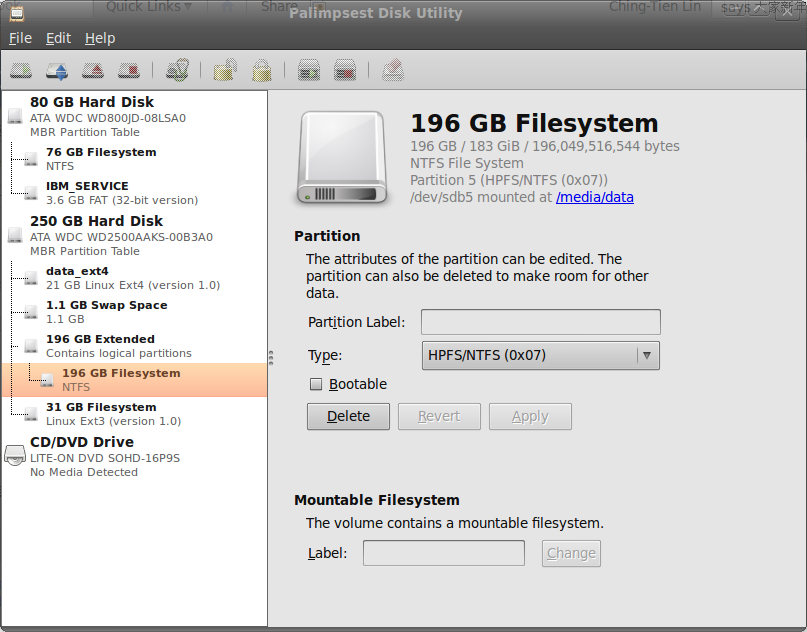
在Ubuntu下除了以前介紹的GParted外,現在在系統(System)->管理(Administration)->磁碟工具(Disk Utility)
也可以進行fdisk的動作,在磁碟工具中可以進行分割區(Partition)的建立(create)、刪除(delete)、格式設定(ext3,ext4,ntfs等),待動作完成後,可至電腦(Computer)中在磁碟機(Driver)上按右鍵(right click),選擇格式化(format)即可完成新磁碟機的所有動作了。

[Ubuntu]備份及還原(Backup and Restore) Ubuntu system

在Windows的世界大家都會想到用 ghost或clonezilla去備份整個作業系統,在Ubuntu有下列兩個方式可以參考
1.使用tar指令(適用於所有的Linux系統)
http://ubuntuforums.org/showthread.php?t=35087

2.使用Sbackup套件
http://www.debianadmin.com/backup-and-restore-your-ubuntu-system-using-sbackup.html

Monday, January 4, 2010

[Ubuntu]ibus輸入法加入完整的行列輸入法

http://mainlander1122.blogspot.com/2009/10/ibus-array-ibus.html

安裝方式有2種
1.使用.deb 下載
2.用原始碼compile,下載原始碼
2.1 解開壓縮檔
./configure
make
sudo make install

sudo cp /usr/local/share/ibus/component/array.xml /usr/share/ibus/component/

sudo cp /usr/local/share/ibus-array/tables/array.db /usr/share/ibus-table/tables/

sudo cp /usr/local/share/ibus-array/icons/ibus-array.png /usr/share/ibus-table/icons/

[For 11.04 Natty]
1.手動安裝
sudo apt-get install ibus-array30
2. restart i-bus

Monday, December 28, 2009

[Ubuntu]終端機介面下好用的文字編輯器-nano

在Linux/Unix下最有名的終端機文字編輯器一定首推vi,但是如果是從Windows轉到Linux/Unix環境時,一定無法習慣vi的使用方式,現在可以嘗試使用nano這個文字編輯器,使用方式與一般視窗介面的文字編輯器相同,非常好上手。在Ubuntu預設已安裝nano。

Thursday, December 17, 2009

[Ubuntu]Lenovo T400 Realtek wireless driver

Lenovo T400 有一款是使用Realtek 8192的無線網路晶片,在Ubuntu 9.10/11.04是沒有driver的,現在終於找到driver了,而且連64bit的都有,真是太感動了

安裝網址:http://www.thinkwiki.org/wiki/ThinkPad_11b/g/n_Wireless_LAN_Mini-PCI_Express_Adapter_II

http://www.php-architect.com/blog/2010/05/01/getting-wireless-to-work-on-lenovo-thinkpad-t400-with-ubuntu-10-4-lucid/