%1 -> command後的第一個參數
Ex: convert.bat test-bat
%1 -> test-bat
-----------------------
@ECHO OFF
echo ffmpeg -i %1-1 -target ntsc-dvd %1-1.avi
ffmpeg -i %1"-1" -target ntsc-dvd %1"-1.avi"
echo ffmpeg -i %1-2 -target ntsc-dvd %1-2.avi
ffmpeg -i %1"-2" -target ntsc-dvd %1"-2.avi"
echo ffmpeg -i %1-3 -target ntsc-dvd %1-3.avi
ffmpeg -i %1"-3" -target ntsc-dvd %1"-3.avi"
echo ffmpeg -i %1-4 -target ntsc-dvd %1-4.avi
ffmpeg -i %1"-4" -target ntsc-dvd %1"-4.avi"
'concat=>合併video
ffmpeg -i "concat:%1-1.avi|%1-2.avi|%1-3.avi|%1-4.avi" -c copy %1.avi
----------------------------------------------------------------------------------
批次將所有檔案轉為xvid格式,並把副檔名改為.avi ex: abc.wmv -> abc.avi
for %%x in (*.*) do ffmpeg -i %%x -c:v libxvid -b:v 2000k %%~nx.avi
--------------------------------------------------------------------------------

Saturday, June 27, 2015

Wednesday, November 12, 2014
[Linux]CentOS定期備份上傳ftp
Linux OS: CentOS 5
開放samba分享目錄存放含中文檔名的資料,如果要定期壓縮備份,使用tar或rar都遇到中文檔名變成亂碼的問題。最後找到用7za可以解決這個中文亂碼的問題。
以下是以7za壓縮要備份的目錄並上傳至ftp
建立shell script "backup.sh"
#!/bin/bash
#START
TIME=`date +"%b-%d-%y"`
FILENAME="backup-$TIME.7z"
SRCDIR="/opt/accnt"
DESDIR="/tmp"
echo "Processing backup folder"
7za a -mx=9 $DESDIR/$FILENAME $SRCDIR
cd /tmp
echo "connect to ftp site"
USERNAME="username"
PASSWORD="password"
SERVER="ftp_ip"
Reference:
http://www.cyberciti.biz/faq/linux-unix-autologin-cron-ftp-script/
http://www.broexperts.com/2012/06/how-to-backup-files-and-directories-in-linux-using-tar-cron-jobs/
http://cybercentos.blogspot.tw/2013/11/install-7zip-on-centos-64-i686.html
開放samba分享目錄存放含中文檔名的資料,如果要定期壓縮備份,使用tar或rar都遇到中文檔名變成亂碼的問題。最後找到用7za可以解決這個中文亂碼的問題。
以下是以7za壓縮要備份的目錄並上傳至ftp
建立shell script "backup.sh"
#!/bin/bash
#START
TIME=`date +"%b-%d-%y"`
FILENAME="backup-$TIME.7z"
SRCDIR="/opt/accnt"
DESDIR="/tmp"
echo "Processing backup folder"
7za a -mx=9 $DESDIR/$FILENAME $SRCDIR
cd /tmp
echo "connect to ftp site"
USERNAME="username"
PASSWORD="password"
SERVER="ftp_ip"
# local directory to pickup *.7z file
#FILE="/tmp"
# remote server directory to upload backup
BACKUPDIR="home"
# login to remote server
ftp -n -i $SERVER <
user $USERNAME $PASSWORD
cd $BACKUPDIR
bin
mput $FILENAME
quit
EOF
rm --force $FILENAME
將backup.sh加入執行權限
chmod +x backup.sh
建立排程工作
ex:每週一、六 pm1:00執行/path/to/backup.sh
crontab -e
# Minutes Hours Day of Month Month Day of Week Command
01 13 * * 1,6 /path/to/backup.sh
Reference:
http://www.cyberciti.biz/faq/linux-unix-autologin-cron-ftp-script/
http://www.broexperts.com/2012/06/how-to-backup-files-and-directories-in-linux-using-tar-cron-jobs/
http://cybercentos.blogspot.tw/2013/11/install-7zip-on-centos-64-i686.html
crontab -e
#   Minutes    Hours      Day of Month       Month    Day of Week    Command

      01        13               *             *        1,6          /bin/bash /backup.sh
- See more at:
http://www.broexperts.com/2012/06/how-to-backup-files-and-directories-in-linux-using-tar-cron-jobs/#sthash.xZv1V1BL.dpufcrontab -e
#   Minutes    Hours      Day of Month       Month    Day of Week    Command

      01        13               *             *        1,6          /bin/bash /backup.sh
- See more at:
http://www.broexperts.com/2012/06/how-to-backup-files-and-directories-in-linux-using-tar-cron-jobs/#sthash.xZv1V1BL.dpufSaturday, October 4, 2014
Adobe Illustrator CS5/CS6/CC 免費電子書
Adobe公司提供Illustrator使用說明(pdf電子書)可以免費下載
http://helpx.adobe.com/tw/illustrator/archive.html
線上直接觀看html
(Illustrator最新版)
https://helpx.adobe.com/tw/illustrator/topics.html
Illustrator CS6
http://helpx.adobe.com/tw/illustrator/topics-cs6.html
Monday, March 18, 2013
[Untuntu]Mount smbfs with read and write
在Ubuntu 10.10 要掛載網路磁碟機並且可以讀寫權限
1. 建立目錄(Create folder)
cd /media
sudo mkdir temp
2.掛載網路磁碟機 (Mount samba share folder)
sudo smbmount //ip_address/foldername /media/temp -o user=username,pass=password,iocharset=utf8,dir_mode=0777,file_mode=0777,uid=current login user name
1. 建立目錄(Create folder)
cd /media
sudo mkdir temp
2.掛載網路磁碟機 (Mount samba share folder)
sudo smbmount //ip_address/foldername /media/temp -o user=username,pass=password,iocharset=utf8,dir_mode=0777,file_mode=0777,uid=current login user name
Tuesday, January 15, 2013
[ffmpeg]剪輯影片- Cutting video
<code>ffmpeg -i in.mp4 -ss [start] -t [duration] -c:v copy -c:a copy out.mp4

time format
start: 00:00:00.000
duration: 00:00:00.000

reference:http://superuser.com/questions/377343/cut-part-from-video-file-from-start-position-to-end-position-with-ffmpeg
</code>

Wednesday, September 26, 2012
[Ubuntu]好用的螢幕截圖並可以編輯的軟體Shutter
Ubuntu 12.04
軟體中心->shutter 安裝即可
Ubuntu 10.04
Synaptic->shutter 安裝
要另外多安裝下列套件,才可有截圖後編輯的功能
Synaptic->libgoo-canvas-perl
Monday, September 17, 2012
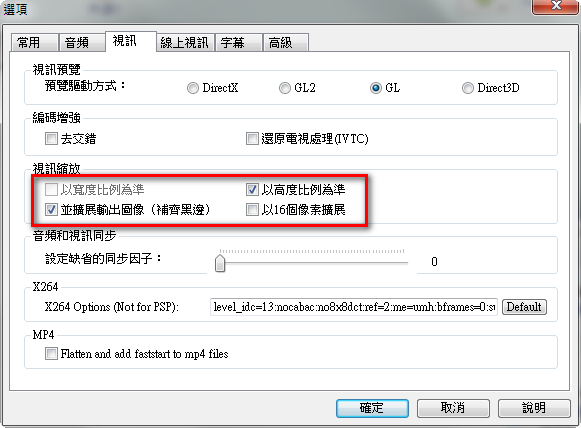
[影片]將手機拍攝的直立影片加上黑框變成橫向影片
使用手機拍攝影片時,常會以直立方式進行拍攝,但在上傳至facebook或其他影音網站時,可能會遇到問題,因此如果能以加上黑邊方式,將影片轉換為橫向影片,就可以解決。
1.下載免費工具Any Video Converter
2.設定選項

1.下載免費工具Any Video Converter
2.設定選項
Subscribe to:
Posts (Atom)